
Import BIM from file
Command - PrB_Import
With this command you can read files of types that are not recognized by AutoCAD.
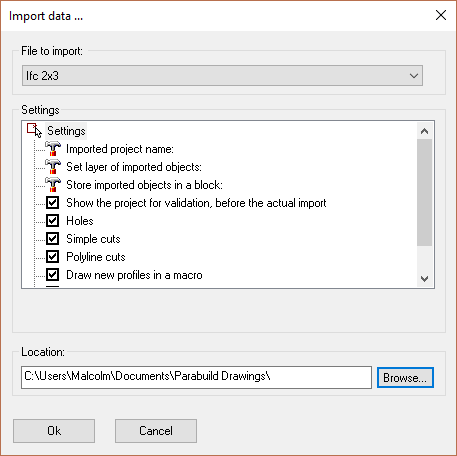
The following file types can be read:
- Ifc 2x3 : This function allows you to read files coming from for example Revit or ArchiCAD, with BIM data. It is used widely in the EU.
Ifc files that were created with Advance Steel will be imported with support for :
- Profiles with an arc as path are now imported
- Assembly information is now imported
- Issues with some plates and profiles with wrong position has been resolved
- Parabuild will attempt to recreate the bolts that are stored in the Ifc file. Some guess work has to be done because Advance Steel only writes some geometry for the bolts.
This will help during the migration process from Advance Steel to Parabuild.
The Ifc import method has the following options :
Import non-Parabuild parts as generic objects (usually meshes) - Parabuild can import non-construction geometry such as ducts and furniture as generic objects.
The objects will be imported as mesh objects.
This allows the drafter to still see the objects that Parabuild couldn't import as steel parts for various reasons. Usually, the cause of that is that the file was generated with a software program that has no knowledge of or relation with structural steel fabrication.
Or it could be that the object is too complex for the software program to write it as an extrusion profile.
Thanks to this feature Parabuild users will only need the BricsCAD BIM Ifc import for the Bimify command to detect and convert member sizes in information-poor Ifc files. By information-poor Ifc files we mean files that are often created by non-structural steel software programs that do not write the extrusions of profiles, but instead they write these as generic boundary representations. Parabuild will still import these generic boundary representations but as meshes, not as profiles.
Import non-building elements such as furnishing, ducts, electricals, equipment, and transport elements - When this is enabled then all non-building elements will be imported. This may make the import process much slower because of the amount and detail that these geometries can have. This option is best combined with the Import non-Parabuild parts as generic objects because these special parts are often not stored as extrusions (Extrusions are what all structural detailing software use to draw profiles).
Import non-building elements into a block reference - When this is enabled then all non-building elements will be stored in a separate block for easier separation from the construction geometry.
- CIS/2.1 LPM6 : This format is used widely in the US. It has been tested to work together with CADWorx Structure. The format is not actively being expanded anymore, and if possible it is recommended to switch to Ifc.
- Measuring points : Allows you to read a simple text file that contains the measuring points that were obtained on site. For each measure point a point object is created.
BIM stands for Building Information Modeling.
In short: BIM is keeping the important information of a 3D Model, and not only the geometry. For example a beam is not only a volume existing of planes and lines, but it has a name, material, welding data, position number, etc... These data are what is known as BIM data. Parabuild saves this data in the drawing together with the geometric data.
BIM data can be exchanged between different applications with the help of the IFC format.
Only the Ifc and CIS/2 formats support exchanging of BIM data.
The other formats support only the exchanging of geometry.