
Performance optimisations
The following options should be considered when you are working on large 3D models and would like to speed up the graphics performance.
Visual styles
The performance of the different visual styles are listed below from best to worse.
For each visual style we explain the recommendations and options that should be set for best performance.
Most of the visual style options that are shown here should already be configured correctly if you are using standard drawing templates from AutoCAD, BricsCAD, or Parabuild.
You can use the command VISUALSTYLES to change the options of each visual style. Note that these settings are stored in the dwg file.
You can use the command GRAPHICSCONFIG to review the status of the 3D video card and whether it is currently being used by AutoCAD.
Shaded is the fastest 3D visual style when faces should be drawn on screen.
For best performance make sure that the FASTSHADEMODE variable is enabled in AutoCAD.
In the visual style options you should make sure that Opacity is a negative value, and that Silhouette edges are not shown.
The edge color should be set to ByEntity.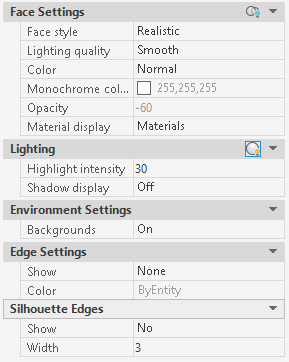
2D wireframe can be very fast for displaying the model. This mode does not use the graphics card because it will not draw any faces. However in AutoCAD when we use the orbit tool to rotate the model around, a switch to a 3D visual style is enforced. This switch can cause a very big delay on large models. This switch does not happen in BricsCAD. Therefore in AutoCAD it would be better to use 3D wireframe instead because the switching to a 3D visual style when orbitting will then not happen.
3D wireframe is the fastest mode when faces do not need to be drawn in AutoCAD. In BricsCAD the 2D wireframe is also a good (or better) option than 3D wireframe.
In the visual style options make sure that the Occluded Edges are shown : 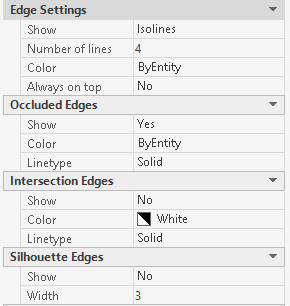
Realistic is less performing than Shaded but it is still a good visual style
In the visual style options you should make sure that Opacity is a negative value, and that Silhouette edges are not shown.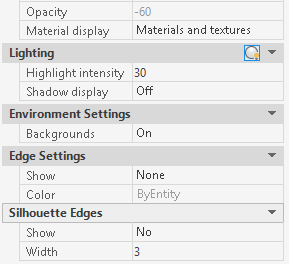
Shaded with edges is less performant than Shaded but it is still a good visual style
In the visual style options you should make sure that Opacity is a negative value, and that Occluded edges and Intersection edges are not shown. Silhouette edges should be enabled for this style.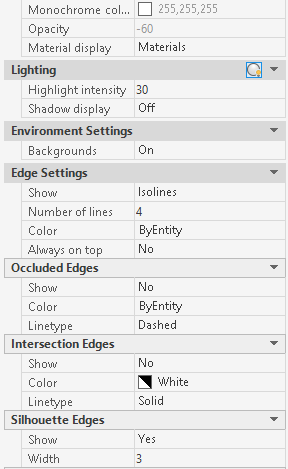
Conceptual does not support enhanced 3D so it is better to use Shaded instead
Shades of grey does not support enhanced 3D so it is better to use Shaded instead
Sketchy does not support enhanced 3D so it is better to use Shaded instead
X-Ray requires a lot of faces and many different colors to be drawn on screen so it should be avoided when performance is important. If you want to see through objects in a large model, then use 2D wireframe in BricsCAD and 3D wireframe in AutoCAD.