
Chain Dimension
Command - Prb_ChainDim
This command will draw a continuous set of dimensions that share the same baseline.
The command input is almost the same as the AutoCAD/BricsCAD Aligned Dimension command.
With the difference that it will ask you for more than 2 dimension points.
It also allows you to draw oblique dimensions. To do that, press <Enter> right after starting the command. Then select an oblique line in the view to which you want the new dimension to be aligned to.
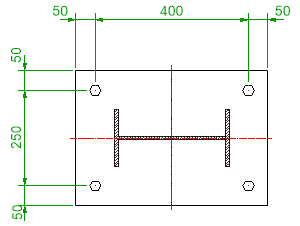
When the new dimensions are drawn on a Parabuild sheet and the current layer is set to 0 then the new dimensions will be set on the Pb_TracWorkshopDims layer so that they get the same colour as automatically drawn dimensions.
But when the current layer is set to a layer other than 0, then the new dimensions will get the current layer. This gives the drafter more control to use colouring schemes when manually drafting dimensions.