Miter cuts
Command - PrB_CutProfsVsEnds
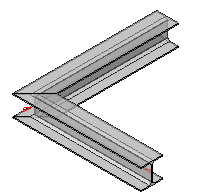
This command will insert a miter joint between two profiles. You will be prompted to select the two beams to be joined, after which, the joint will be placed. This command will repeat until you press <Enter> to stop.
The default offset that this command uses for all new cuts is set in the Global settings under the Distances category, the setting is called Standard tolerance for cutting.
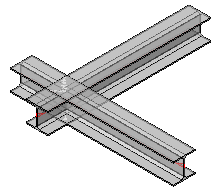
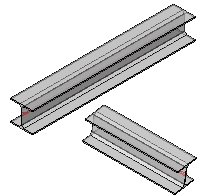
This will work with all profiles, at any angle relative to each other. It will also join intersecting or non-intersecting profiles.
Profile of different sizes may also be mitered, but this practice is not recommended without an analysis of the result.
|
|
|
|
|
Intersecting Profiles |
Non-Intersecting Profiles |
Resulting Mitered Joint |