
Dimensions
All dimensions are defined by AutoCAD/BricsCAD, so we refer to the help of those programs for assistance in using and modifying them.
However Parabuild does fully support these objects for dimensioning Parabuild views, and Parabuild also actively draws these dimensions with the Automated Dimensions tools.
In that regard we need to explain the following properties of the dimensions because Parabuild will influence them on sheets :
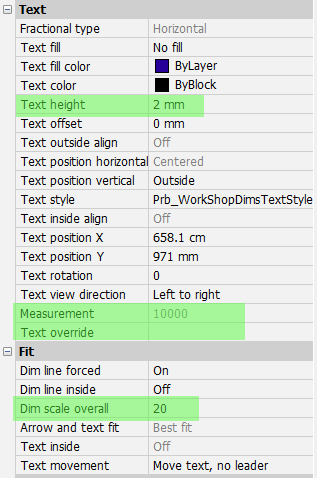
Text height - Parabuild will actively change this field to reflect the dimension text height chosen in the Sheet properties
Measurement - This measurement value is what AutoCAD/BricsCAD is currently measuring for that dimension. But this value is incorrect when the view is shortened or when the added scale property was used on the View.
To fix that, Parabuild will actively manage the next property Text override and it will set the correct measurement value there no matter the shortening or scaling.
Text override - If you want to use this property to change the label of the dimension, then you could enter the characters "<>" somewhere in your text.
The "<>" characters can be used to choose the location of the measurement value in your text fields.
But note that this Text override property will still be ignored if the Parabuild text template was set.
However do keep in mind that if the AutoCAD/BricsCAD measurement does not match with the actual measurement done by Parabuild, then the <> will be removed in the override.
This can happen with shortening or if the view has added scaling relative to the sheet.
Therefore Parabuild transfers such AutoCAD/BricsCAD override to the Parabuild dimension text template if the template is empty and the Parabuild measurement is not consistent with the AutoCAD/BricsCAD measurement.
From that point forward, the drafter should do further modifications in the text template in the Dimension group settings and not the AutoCAD/BricsCAD override because only the Parabuild override will be persistent.
Dim scale overall - Parabuild uses this field to actively rescale the text and leaser sizes of all the dimensions on the sheet. This value will match exactly the scale of the sheet to make the dimensions display properly no matter the scale of the Sheet.
(Note that normally all the views are drawn 1 to 1 on the sheet, and the frame and title block are scaled to make it work for the chosen format and scale of the sheet)