
Switch Profile/Plate triangle direction
Command - PrB_SwitchProfEcs
This tool allows you to switch the location of the triangle of a profile or plate.
The triangle of a profile determines the profile's orientation on the workshop drawings, at least if the workshop drawings are set up to use the profile's direction for the views.
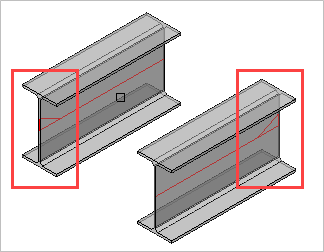
For a plate, the triangle can also be switched. This would be useful for influencing the contour side in DXF files.
Note that for plates the long triangle is not necessarily the X axis of the plate. This triangle's orientation can be changed in the Global settings or even be replaced by a small coordinate system called Detailed Ucs icon.