Cut against a part (shorten only)
Command - PrB_AddPrPlCut
This command allows us to shorten a profile against another part. The new end cut of the profile will be aligned to the other part.
On activating this command, you will be prompted to: Select the plates or beams you would like to cut.
You will be further prompted to indicate: The cutting plate or profile.
The profile or plate will immediately be cut to the main face of the cutting plate/profile.
This tool will cut against the web of I or U shapes.
If you need to cut to another face, then use the Add planar cut against a surface tool instead.
|
|
|
|
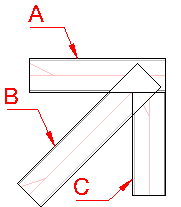
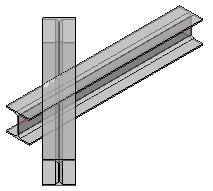
The profiles before applying the cut |
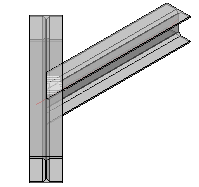
The profiles after applying the cut |
The default offset that this command uses for all new cuts is set in the Global settings under the Distances category, the setting is called Standard tolerance for cutting.
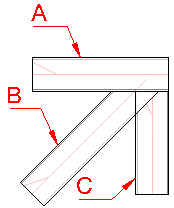
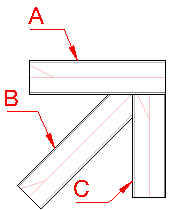
This tool will only shorten the profile. Therefore it becomes possible to combine multiple end-cuts on a profile at the same end :
|
|
|
|
|
The profiles before applying the cuts |
The result after cutting profile B against profile A |
The result after cutting profile B against profile C |