
Dynamic properties
Dynamic properties are custom properties that the user can assign to Parabuild objects.
This allows additional properties to be created to supplement the properties already offered by Parabuild.
Additional properties can be created using the Global settings dialog window. All properties shown here are also available and adaptable in the Properties panel.
Every dynamic property can also be activated as a column in the parts list (also on workshop drawings).
These dynamic properties are not listed as columns in the bills themselves, but we can still display them on the bills by using the Fixed template strings in the general output settings dialog.
The name of the dynamic property should be set between % symbols inside the template string. For example : %MyCustomPropertyName%
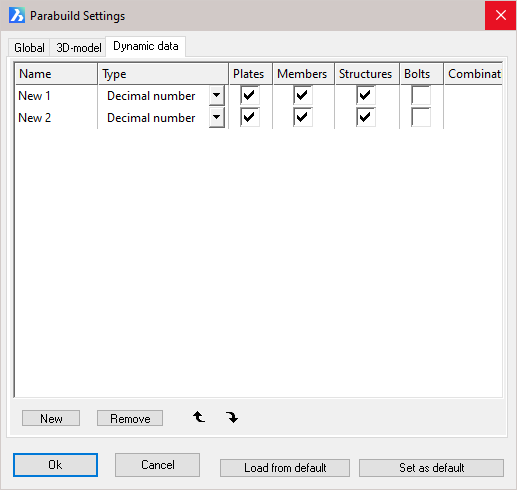
Name - This is the name that will be used in the properties panel and can be used between %% in annotations and in Fixed template strings. It is used to uniquely identify the property.
Type - This the determined value of the property. From the drop-down menus select either:
Decimal number - e.g. 00
Comma delimited number - e.g. 00.0
Text - e.g. Stock No. 5
Combination-text - This can be used to contain a fixed number of predetermined texts. These texts should be entered in the last column
Plates - Tick the checkbox to make the property visible for all plates
Members - Tick the checkbox to make the property visible for all members
Structures - Tick the checkbox to make the property visible for all structures
Bolts - Tick the checkbox to make the property visible for all bolts
Combination text - The texts should be separated with a comma. E.g. “steel,concrete,aluminum” will allow you to make a selection of these three materials.