
Properties to be used in annotations and bills
These properties are available to be used in annotations and bill of materials to retrieve data from 3D or 2D entities.
The properties listed in this topic were created to retrieve data from the following objects :
- All 3D parts : Plates, profiles, structures, volumes and bolts
- Holes (which are sub-entities)
- Sheets
- Views
- Cameras
- Special properties for counting the number of parts. These will only work inside bills of materials and sometimes also on the annotation of a view.
The property names are always entered between % symbols so that they are properly recognized as properties that still need to be replaced by an actual value.
These are 2 examples of how the properties can be used in the contents of annotations :
|
Text used in the template string |
Resulting text |
|
ø%PbColBoltDiamater% |
ø16 |
|
%PbColPosNumber%-%PbColName% L%PbColLength% |
PR1-IPE200 L3590 |
By using Fixed template strings in the general output settings dialog we can have the same capabilities as above inside all bills.
Below the 3 different kinds of properties are listed
Bill columns and properties
This is the full list of all the available columns/properties that were created specifically for bills and annotations.
Some of these columns are specific to bills such as unit and total quantities and those will not work inside annotations.
|
Property name |
Description |
|
Common properties for plates, profiles, structures and volumes |
|
|
PbColPhase |
Phase |
|
PbColPosRevision |
Pos Revision |
|
PbColSequence |
Erection sequence |
|
PbColClashing |
Clashing |
|
PbColObjectType |
Object type (number) |
|
PbColObjectTypeDesc |
Object type (description) |
|
PbColStructuralType |
Structural type |
|
PbColAssemblyStructuralType |
Assembly Structural type |
|
PbColName |
Name |
|
PbColPosNumber |
Position number |
|
PbColPosPrefix |
Pos Prefix |
|
PbColPosSuffix |
Pos Suffix |
|
PbColPosStartNr |
Pos Startnumber |
|
PbColPosPreferredNr |
Pos preferred number |
|
PbColLength |
Length |
|
PbColUnitWeight |
Weight per piece |
|
PbColWeightPerLengthUnit |
Weight per meter for Metric and per inch for Imperial |
|
PbColWeightFactor |
Weight factor |
|
PbColVolume |
Volume |
|
PbColPaintSurface |
Paintsurface |
|
PbColLevel |
Level height |
|
PbColRemark |
Remark |
|
PbColMaterial |
Quality |
|
PbColFinishing |
Finishing |
|
PbColPaintColor |
Paint |
|
PbColFabricator |
Manufacturer |
|
PbColGroup |
Extra property |
|
PbColGUID |
Unique identifier |
|
PbColCostCategoryCode |
Cost Category Code |
|
PbColAssemblyCostCategoryCode |
Assembly Cost Category Code |
|
PbColLotName |
Lot name |
|
PbColIsMainPart |
Is main part |
|
PbColIsWelded |
Is welded |
|
PbColNrOfHoles |
Number of holes |
|
PbColNrOfCuts |
Number of cuts |
|
PbColNrOfDstvPoints |
Number of DSTV welds |
|
PbColNrOfDstvContours |
Number of DSTV contours |
|
PbColBiggestHoleDiam |
Largest hole diameter |
|
PbColAllMarksForPos |
All assemblies |
|
PbColStatus |
Is the part located on a sheet or not |
|
|
|
|
Properties for plates only |
|
|
PbColWidth |
Width |
|
PbColThickness |
Plate thickness |
|
PbColIsEndplate |
Is an endplate |
|
|
|
|
Properties for profiles only |
|
|
PbColStartAngle1 |
Ang start 1 |
|
PbColStartAngle2 |
Ang start 2 |
|
PbColEndAngle1 |
Ang end 1 |
|
PbColEndAngle2 |
Ang end 2 |
|
PbColIsStrip |
Is a strip |
|
PbColBeamCamber |
Beam Camber |
|
|
|
|
Properties for assemblies only |
|
|
PbColMarkNumber |
Assembly number |
|
PbColMarkPrefix |
Assembly Prefix |
|
PbColMarkSuffix |
Assembly Suffix |
|
PbColMarkStartNr |
Assembly Startnumber |
|
PbColMarkPreferredNr |
Preferred assembly number |
|
PbColMarkPaintSurface |
Paint surface of assembly |
|
PbColMarkWeight |
Weight of assembly |
|
PbColMarkVolume |
Volume of assembly |
|
PbColMarkTotalLength |
Total length of assembly |
|
PbColMarkTotalWidth |
Total width of assembly |
|
PbColMarkTotalHeight |
Total height of assembly |
|
PbColMarkRevision |
Assembly Revision |
|
PbColMarkSequence |
Assembly production sequence |
|
PbColMarkGrid |
This will contain the position of the assembly relative to the grid lines. It will display the 2 closest grid line names |
|
PbColMarkMainName |
Name of main part |
|
PbColMarkMainPosNumber |
Main part number |
|
PbColMarkMainLength |
Length of main |
|
PbColMarkMainMaterial |
Material of main |
|
PbColMarkMainFinishing |
Finishing of main |
|
PbColMarkMainColor |
Color of main |
|
PbColMarkMainFabricator |
Fabricator of main |
|
PbColMarkStructuralDesc |
Assembly structural description |
|
PbColMarkNrOfSubs |
Number of welded parts |
|
PbColMarkNrOfHoles |
Assembly number of holes |
|
PbColMarkNrOfCuts |
Assembly number of cuts |
|
|
|
|
Properties for sheets only |
|
|
PbColSheetName |
Sheet name |
|
PbColSheetType |
Type of sheet |
|
PbColSheetScale |
Sheet scale |
|
PbColSheetFormat |
Format of the sheet |
|
PbColSheetPrinted |
Sheet was printed |
|
PbColSheetLastPrintTimeDate |
Last print time |
|
PbColSheetChanged |
Sheet has changed |
|
PbColSheetChecked |
Sheet was checked |
|
PbColSheetCheckedBy |
Sheet checked by |
|
PbColSheetRevision |
Revision of sheet |
|
PbColSheetNameNoFolder |
This returns the sheet name without any sub folders. This would be the same as the filename when the sheet is exported to a Pdf or dwg file. |
|
|
|
|
Properties for views only |
|
|
PbBillColViewName |
Name of the view |
|
PbBillColViewScale |
Scale of the view |
|
|
|
|
Properties for bolts only |
|
|
PbColBoltDiameter |
Bolt diameter |
|
PbColBoltHoleDiameter |
Hole diameter |
|
PbColBoltHoleTolerance |
Hole tolerance |
|
PbColBoltAssembly |
Bolt type |
|
PbColBoltAssemblyNorm |
Bolt standard |
|
PbColBoltLength |
Bolt length |
|
PbColBoltNetLength |
Bolt net length |
|
PbColBoltAddedLength |
Bolt added length |
|
PbColBoltShopBolted |
Shop bolted |
|
PbColBoltLastHoleThreaded |
Last hole is threaded |
|
PbColBoltLastHoleBlind |
Last hole is blind |
|
PbColBoltCountersunk |
With countersunk hole |
|
PbColBoltConnectedMarks |
Connected assemblies |
|
PbColBoltWasher1Assembly |
Washer 1 |
|
PbColBoltWasher2Assembly |
Washer 2 |
|
PbColBoltWashersAssembly |
Filler washers |
|
PbColBoltNut1Assembly |
Nut 1 |
|
PbColNrOfBoltsInPattern |
Number of equal bolts in the same pattern |
|
PbColBoltNrOfNuts |
Number of nuts used by the bolt |
|
PbColBoltNrOfRegularWashers |
Number of regular washers used by the bolt |
|
PbColBoltNrOfFillerWashers |
Number of filler washers used by the bolt |
|
PbColBoltNrOfAllWashers |
Total number of washers used by the bolt : regular and filler washers combined |
|
PbColBoltNut2Assembly |
Nut 2 |
|
PbColBoltConnectedAssemblies |
Connected assemblies |
|
PbColBoltName |
Bolt name |
|
PbColBoltType |
Bolt type |
|
PbColBoltStandard |
Bolt standard |
|
PbColBoltMaterial |
Bolt material |
|
PbColBoltGrade |
Bolt grade |
|
PbColBoltWrenchWidth |
Bolt wrench width |
|
PbColBoltHeadDiameter |
Bolt head diameter |
|
PbColBoltHeadHeight |
Bolt head height |
|
PbColBoltThreadLength |
Bolt thread length |
|
|
|
|
Properties for holes only |
|
|
PbColHoleDiameter |
Hole diameter |
|
PbColThreadDiameter |
Thread diameter |
|
PbColCountersunkDiameter |
Countersunk diameter |
|
PbColCountersunkDepth |
Countersunk depth |
|
PbColBlindDepth |
Blind hole depth |
|
PbColHoleComment |
Hole comment |
|
PbColIsThreadedHole |
Is threaded hole |
|
PbColIsCountersunkHole |
Is countersunk |
|
PbColIsCounterboreHole |
Is counterbore |
|
PbColIsBlindHole |
Is blind hole |
|
PbColIsFieldHole |
Is site hole |
|
PbColSlotHoleCentersLength |
Length axis to axis |
|
PbColSlotHoleTotalLength |
Slothole total length |
|
PbColCommentForHoleDriller |
Comment for hole driller |
|
PbColHoleType |
Contains Countersunk, Blind, Slot, Threaded, or empty if regular hole |
|
PbColHoleSize |
Contains øxx for hole, øxx+length for slot, øxx+angle for countersunk, øxx+øxx+depth for counterbore |
|
PbColNrOfHolesInPattern |
Number of equal holes in the same pattern |
|
|
|
|
Properties for annotations only |
|
|
PbColElevation |
Level |
|
PbColWeldOffset |
Weld offset |
|
|
|
|
Properties for bills only |
|
|
PbUnitQuantity |
Quantity for one unit |
|
PbTotalQuantity |
Total quantity |
|
PbMarkQuantity |
Number of assemblies |
|
PbPosQuantityInOneMark |
Number of parts used in one assembly |
|
PbColTotalWeight |
Total weight |
|
PbColTotalPaintSurface |
Total paint surface |
|
PbColTotalVolume |
Total volume |
|
PbColInternalPosNumber |
Internally used part position number |
|
PbColInternalMarkNumber |
Internally used assembly number |
|
PbColOutputTag |
|
|
|
|
|
Properties for cameras only |
|
|
PbColViewDefType |
Type of the camera (number) |
|
PbColViewDefTypeDesc |
Type of the camera (description) |
|
PbColViewDefName |
Name of the camera |
|
PbColViewDefMasterName |
Name of the accompanying master camera |
|
Properties for welds only |
|
|
PbColWeldType |
The weld type of the arrow side as an integer (Fillet, Bevel, V, ...) |
|
PbColWeldTypes |
Combines ArrowSide weld type with OtherSide weld type (Fillet, Bevel, V, ...) |
|
PbColWeldNumber |
Unique number for each weld object |
|
PbColWeldSize |
Combination of sizes (ISO: asz style) |
|
PbColWeldFilletLegSize |
Fillet leg size |
|
PbColWeldBevelDepth |
Bevel depth |
|
PbColWeldDesignThroat |
Design throat. Design throat is the same as nominal throat size (a for ISO). |
|
PbColWeldAngle |
Bevel angle / Groove angle |
|
PbColWeldInShop |
For shop welded: 1, For site welded: 0 |
|
PbColWeldLength |
Length of the weld path |
|
PbColWeldSectionArea |
Cross section area of the weld (average if area varies) |
|
PbColWeldVolume |
volume |
|
PbColWeldWeight |
Weight |
|
PbColWeldNumSegments |
Num segments |
|
PbColWeldProcessType |
Process type |
|
PbColWeldInspection |
Inspection |
|
PbColWeldTailReference |
Tail reference |
|
PbColWeldPart1 |
The part number of the first part to be welded |
|
PbColWeldPart2 |
The part number of the second part to be welded |
|
PbColWeldAssembly |
The assembly number if both parts are in the same assembly |
|
PbColGlobalIdIfc |
This returns the global id of the part as they are written in Ifc files. This global Id is calculated based on the GUID that Parabuild uses but compressed using the method explained in the Ifc standard. |
Properties and queries
The following properties are directly available to be used in annotations.
Inside bills these are not listed as columns in the bills themselves, but we can still display them on the bills by using the Fixed template strings in the general output settings dialog. We can use these property/query names between %% inside the fixed template string.
|
Property or Query name |
Description |
|
PbPropertyClosestGrid |
Can be the grid in X or Y direction : whichever is best aligned and closest |
|
PbPropertyClosestGridX |
The center of the object is projected and used to find the closest grid line |
|
PbPropertyClosestGridY |
The center of the object is projected and used to find the closest grid line |
|
PbPropertyClosestLevel |
The center of the object is projected and used to find the closest level |
|
PbPropertyClosestGridXOffset |
X distance to the closest grid line. Axis based for members, a bounding box is used for others object types |
|
PbPropertyClosestGridYOffset |
Y distance to the closest grid line. Axis based for members, a bounding box is used for others object types |
|
PbPropertyClosestLevelOffset |
Z distance to the closest level. Axis based for members, a bounding box is used for others object types |
|
PbPropertyStartGridX |
A bounding box (or axis for members) is tested versus the grid, the "lowest" X grid name is returned (bounding box minimum corner) |
|
PbPropertyStartGridY |
A bounding box (or axis for members) is tested versus the grid, the "lowest" Y grid name is returned (bounding box minimum corner) |
|
PbPropertyStartLevel |
A bounding box (or axis for members) is tested versus the level, the "lowest" level name is returned (bounding box minimum corner) |
|
PbPropertyEndGridX |
A bounding box (or axis for members) is tested versus the grid, the "lowest" X grid name is returned (bounding box maximum corner) |
|
PbPropertyEndGridY |
A bounding box (or axis for members) is tested versus the grid, the "lowest" Y grid name is returned (bounding box maximum corner) |
|
PbPropertyEndLevel |
A bounding box (or axis for members) is tested versus the level, the "lowest" level name is returned (bounding box maximum corner) |
|
PbPropertyDisplayStyle |
How the part should be displayed in 2D and 3D visual styles |
|
PbPropertyBoltDisplayStyle |
How the bolt should be displayed in 2D and 3D visual styles |
|
PbPropertySectionApprox |
Approximation of the member's section |
|
PbPropertyPathApprox |
Approximation of the member's axis |
|
PbPropertyIsUnfoldedPart |
Whether the part was unfolded or not |
|
PbPropertyUnfoldEnableType |
0=off 1=enabled 2=default (decided by section table) |
|
ViewNumber |
Number of the view |
|
CameraName |
Name of the camera (direct from camera or from view if there is a camera linked to the view) |
|
|
|
|
OtherSheetName |
Just like SheetName, but it only has a value when the callout camera refers to another sheet |
|
OtherSheetNumber |
Just like SheetNumber, but it only has a value when the callout camera refers to another sheet |
|
|
|
|
View relation to the Part/Camera/WCS |
|
|
ViewZAngleToEcsX |
Angle rotation (up to 180°) to the EcsX of the MainPart on part/assembly drawings, or CameraX for GA's. |
|
ViewZAngleToEcsY |
Angle rotation (up to 180°) to the EcsY of the MainPart on part/assembly drawings, or CameraY for GA's. |
|
ViewZAngleToEcsZ |
Angle rotation (up to 180°) to the EcsZ of the MainPart on part/assembly drawings, or CameraZ for GA's. |
|
ViewZAngleToWcsX |
Angle rotation (up to 180°) to the WcsX |
|
ViewZAngleToWcsY |
Angle rotation (up to 180°) to the WcsY |
|
ViewZAngleToWcsZ |
Angle rotation (up to 180°) to the WcsZ |
|
|
|
|
AcadLayer |
|
|
AcadMaterial |
|
|
AcadColor |
|
|
IsSubPart |
|
|
IsMainPart |
|
|
IsBolt |
|
|
IsWeld |
|
|
IsPlate |
|
|
IsStrip |
|
|
IsProfile |
|
|
IsBody |
|
|
IsStruct |
|
|
IsGrating |
|
|
IsFloorPlate |
|
|
IsStud |
|
|
IsTread |
|
|
Phase |
|
|
LotName |
|
|
BeamCamber |
|
|
Material |
|
|
Finishing |
|
|
Paint |
|
|
Manufacturer |
|
|
Remark |
|
|
ColorGroup |
|
|
StructGroup |
|
|
Sequence |
|
|
CostCategoryCode |
|
|
GUID |
|
|
DisplayStyle |
|
|
BoltDisplayStyle |
|
|
StructuralType |
|
|
StructuralTypeParent |
|
|
StructuralTypeChain |
|
|
StandardStructuralType |
|
|
PreClassifiedType |
|
|
HasStructuralType |
|
|
HasStandardStructuralType |
|
|
Name |
|
|
Length |
|
|
LengthGross |
|
|
Thickness |
|
|
WebThickness |
|
|
FlangeThickness |
|
|
SectionName |
|
|
SectionSysName |
|
|
SectionPrefix |
|
|
SectionType |
|
|
SectionHeight |
|
|
SectionWidth |
|
|
SectionDiameter |
|
|
SectionInnerDiameter |
|
|
SectionFilletRadius |
|
|
SectionArea |
|
|
SectionPerimeter |
|
|
SectionExtentRadius |
|
|
SectionNumVertices |
|
|
SectionHasArc |
|
|
SectionSymmetricX |
|
|
SectionSymmetricY |
|
|
SectionApproximation |
|
|
NumberFull |
|
|
NumberInteger |
|
|
NumberPrefix |
|
|
NumberSuffix |
|
|
NumberStart |
|
|
NumberPreferred |
|
|
Revision |
|
|
IsStandardPartFromLib |
|
|
LabelTemplate1 |
|
|
LabelTemplate2 |
|
|
SkipBOM |
|
|
SkipTags |
|
|
SkipPartDrawings |
|
|
SkipAssemblyDrawings |
|
|
SkipGADrawings |
|
|
VolumeNet |
|
|
VolumeGross |
|
|
SurfaceAreaNet |
|
|
SurfaceAreaGross |
|
|
Weight |
|
|
WeightNet |
|
|
WeightGross |
|
|
WeightPerLengthUnit |
|
|
MaterialWeight |
|
|
PartHasHole |
|
|
PartHasSlotHole |
|
|
PartHasCSunkHole |
|
|
PartHasCBoreHole |
|
|
PartHasThreadedHole |
|
|
PartHasFieldHole |
|
|
PartHasFieldHole |
|
|
PartNumHoles |
|
|
PartHoleDiam |
|
|
PartMinHoleDiam |
|
|
PartMaxHoleDiam |
|
|
PartIsBolted |
|
|
PartIsShopBolted |
|
|
NumCuts |
|
|
NumPlaneCuts |
|
|
NumPolyCuts |
|
|
SawAngleStartY |
|
|
SawAngleStartZ |
|
|
SawAngleEndY |
|
|
SawAngleEndZ |
|
|
PlateNumVertices |
|
|
PlateHasArc |
|
|
IsRoundPlate |
|
|
IsSquarePlate |
|
|
IsRectangularPlate |
|
|
IsTriangularPlate |
|
|
PathNumVertices |
|
|
PathIsStraight |
|
|
PathIsArc |
|
|
PathHasArc |
|
|
PathApproximation |
|
|
IsUnfoldedPart |
|
|
UnfoldEnableType |
|
|
NumPartsInAssembly |
|
|
NumShopBoltsInAssembly |
|
|
BoltDiameter |
|
|
BoltHoleDiameter |
|
|
BoltHoleTolerance |
|
|
BoltAssembly |
|
|
BoltAssemblyStandard |
|
|
BoltLength |
|
|
BoltNetLength |
|
|
BoltIsShopBolted |
|
|
BoltIsSunken |
|
|
BoltNumParts |
|
|
BoltIsAnchor |
|
|
MinBoundX |
|
|
MinBoundY |
|
|
MinBoundZ |
|
|
MaxBoundX |
|
|
MaxBoundY |
|
|
MaxBoundZ |
|
|
MidPointX |
|
|
MidPointY |
|
|
MidPointZ |
|
|
CenterOfGravityX |
|
|
CenterOfGravityY |
|
|
CenterOfGravityZ |
|
|
AxisStartX |
|
|
AxisStartY |
|
|
AxisStartZ |
|
|
AxisEndX |
|
|
AxisEndY |
|
|
AxisEndZ |
|
|
PartParaToWcsX |
|
|
PartParaToWcsY |
|
|
PartParaToWcsZ |
|
|
PartPerpToWcsX |
|
|
PartPerpToWcsY |
|
|
PartPerpToWcsZ |
|
|
PartAngleToWcsX90 |
|
|
PartAngleToWcsY90 |
|
|
PartAngleToWcsZ90 |
|
|
PartAngleToWcsX180 |
|
|
PartAngleToWcsY180 |
|
|
PartAngleToWcsZ180 |
|
|
PartParaToMainAxis |
|
|
PartParaToMainEcsY |
|
|
PartParaToMainEcsZ |
|
|
PartPerpToMainAxis |
|
|
PartPerpToMainEcsY |
|
|
PartPerpToMainEcsZ |
|
|
PartAngleToMainAxis90 |
|
|
PartAngleToMainEcsY90 |
|
|
PartAngleToMainEcsZ90 |
|
|
PartAngleToMainAxis180 |
|
|
PartAngleToMainEcsY180 |
|
|
PartAngleToMainEcsZ180 |
|
|
PartMainEcsYCentered |
|
|
PartMainEcsZCentered |
|
|
PartInsideMainSection |
|
|
PartOutsideMainSection |
|
|
PartDistanceOnPath |
|
|
PartDistanceToPathEnd |
|
|
PartOutsideMainEnd |
|
|
PartOffsetInsideMainEnd |
|
|
PartOffsetOutsideMainEnd |
|
|
PartTouchesMainEnd |
|
|
PartTouchesMainExtrusion |
|
|
PartTouchesMainOuterExtent |
|
|
PartTouchesMultiMainPlates |
|
|
PartTouchesMainPlateFace |
|
|
PartTouchesMainWebPlate |
|
|
PartTouchesMainFlangePlate |
|
|
PartTouchesMainFlangeSide |
|
|
PartTouchesMainTopFlange |
|
|
PartTouchesMainBottomFlange |
|
|
PartTouchesMainBothFlanges |
|
|
PlateSideTouchesMain |
|
|
PlateFaceTouchesMain |
|
|
CutPlaneTouchesMain |
|
|
PartTouchesSubPart |
|
|
PartTouchesEndPlate |
|
|
PartTouchesTriangularPlate |
|
|
PartTouchesSubPartPlateFace |
|
|
PartTouchesSubPartPlateSide |
|
|
PartPlateFaceTouchesSubPart |
|
|
PlateSideTouchesSubPart |
|
|
PartTouchesPartType |
|
|
PartBoltedToMain |
|
|
PartBoltedToPartType |
|
|
PartBoltedToWeb |
|
|
PartBoltedToFlange |
|
|
PartBoltedToWebOfType |
|
|
PartBoltedToFlangeOfType |
|
|
PartBoltedToTopFlange |
|
|
PartBoltedToBottomFlange |
|
|
DetectColumn |
|
|
DetectBeam |
|
|
DetectRafter |
|
|
DetectGirder |
|
|
DetectGirt |
|
|
DetectPurlin |
|
|
DetectEaveStrut |
|
|
DetectBracing |
|
|
DetectStairStringer |
|
|
DetectStairAssembly |
|
|
DetectHandrail |
|
|
DetectRailingPost |
|
|
DetectKneerail |
|
|
DetectKickPlate |
|
|
DetectRailingAssembly |
|
|
DetectLadderAssembly |
|
|
DetectTrussAssembly |
|
|
DetectCladding |
|
|
DetectSagRod |
|
|
DetectBasePlate |
|
|
DetectEndPlate |
|
|
DetectStiffener |
|
|
DetectClipAngle |
|
|
DetectToePlate |
|
|
DetectFinPlate |
|
|
DetectShearTab |
|
|
DetectSplicePlate |
|
|
DetectHaunchWeb |
|
|
DetectHaunchFlange |
|
|
DetectHaunchProfile |
|
|
DetectGussetPlate |
|
|
StartConnectedToBeam |
|
|
StartConnectedToColumn |
|
|
EndConnectedToBeam |
|
|
EndConnectedToColumn |
|
|
StartConnectionIsT |
|
|
EndConnectionIsT |
|
|
MacroName |
|
|
MacroGroup |
|
|
ModuleName |
|
|
ModuleGroup |
|
|
MacroIsMainEndConn |
|
|
MacroVariableValue |
|
|
ProjectedAreaWcsX |
|
|
ProjectedAreaWcsY |
|
|
ProjectedAreaWcsZ |
|
|
ProjectedAreaWcsXGross |
|
|
ProjectedAreaWcsYGross |
|
|
ProjectedAreaWcsZGross |
|
|
ProjectedAreaEcsX |
|
|
ProjectedAreaEcsY |
|
|
ProjectedAreaEcsZ |
|
|
ProjectedAreaEcsXGross |
|
|
ProjectedAreaEcsYGross |
|
|
ProjectedAreaEcsZGross |
|
|
ClosestGrid |
|
|
ClosestGridX |
|
|
ClosestGridY |
|
|
ClosestLevel |
|
|
ClosestGridXOffset |
|
|
ClosestGridYOffset |
|
|
ClosestLevelOffset |
|
|
StartGridX |
|
|
StartGridY |
|
|
StartLevel |
|
|
EndGridX |
|
|
EndGridY |
|
|
EndLevel |
|
|
BoltSlotHoleAngle |
This returns the angle of the bolt's slot hole in WCS coordinates |
|
IsWeldSymbol |
This returns "1" when the object is a weld symbol annotation |
|
IsInvalidDimOrLabel |
This returns "1" when the dimension or annotation is invalid. Invalid for a dimension means that the measurement failed. Invalid for an annotation means that the contents for the annotation text could not be retrieved from the annotated part. |
|
AcadClassName |
This returns the classname of the object. This will work on all objects owned by AutoCAD, Parabuild, and all other 3rd party applications. The class name for a line is LINE, for a polyline it is LWPOLYLINE, and for a parabuild plate it is S3d_Plate. To learn the class name of an object you can use the LIST command. |
Dynamic properties
Dynamic properties are custom properties that you can create yourself for when you need more properties than the defaults offered by Parabuild.
Every Dynamic property can also be activated as a column in the parts list (also on workshop drawings).
These dynamic properties are not listed as columns in the bills themselves, but we can still display them on the bills by using the Fixed template strings in the general output settings dialog.
The name of the dynamic property should be set between % symbols inside the template string. For example : %MyCustomPropertyName%
Project data
We can use both fixed and custom Project Data in annotations and bills.
The list of fixed project data are listed in the Template settings topic.
Expressions and functions
We can use expressions and functions in this string to make the resulting text very flexible by using calculations on the variables such as + - / * and also the IF statement to make the string different based on a condition of the part.
Read more about this in the Expressions and functions topic.
Sheet information
Sheet information such as sheet name, sheet format and creation date or time are also available when used between %%, such as %PrB_SheetName%.
They are only available in annotations and text fields inside sheets.
The available sheet data fields are listed in the Template settings topic.
Properties that need extra explanation
Macro values (MacroVariableValue)
In the above list there is a special query variable called MacroVariableValue that warrants more explanation. This is an example use of this query :
%(%MacroVariableValue.Bolts.Pattern.Count1%*%MacroVariableValue.Bolts.Pattern.Count2%)% x %MacroVariableValue.Bolts.BoltAssembly%
The above text field could result in : 4 x Anchor rod
The variable retrieval is shown in blue, expression information is shown in red, and static text is shown in green.
The MacroVariableValue query will search for the macro that owns the annotated part or part in the bill, and will return information from that macro.
The MacroVariableValue query uses the same naming rules as the excel feeding mechanism to extract variable data from the macro and it's modules. Refer to the excel feeding topic to learn how to set the names in this query.
Profile end angles of saw cuts (PbColStartAngleX and PbColEndAngleX)
The properties PbColStartAngle1, PbColStartAngle2, PbColEndAngle1, and PbColEndAngle2 refer to the planar end-cuts of profiles.
These planar end-cuts can be described by the four angle values.
The angles are all measured relative to the ECS (Element Coordinate System) of the profile, which is drawn as a triangle for each profile.
The angles can be positive as well as negative.
Below you can find a practical example of each angle property, in case they are positive or negative :
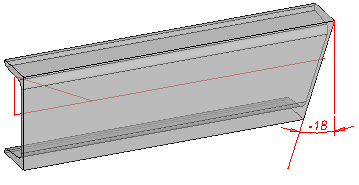
Angle end1 : -18°
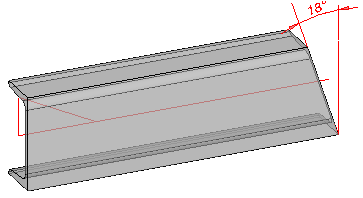
Angle end1 : 18°
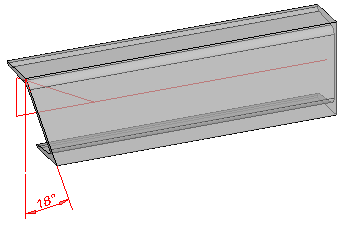
Angle start 1: 18°
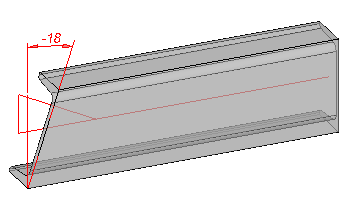
Angle start 1: -18°
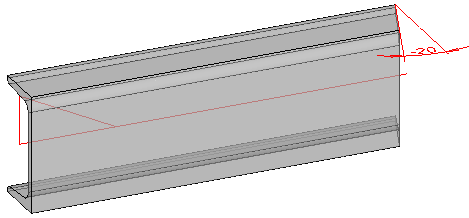
Angle end 2: -20°
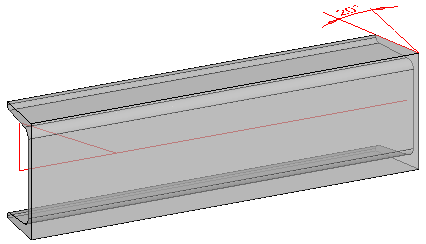
Angle end 2: 20°
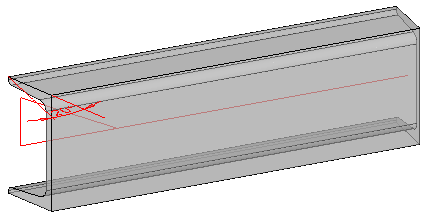
Angle start 2: 20°
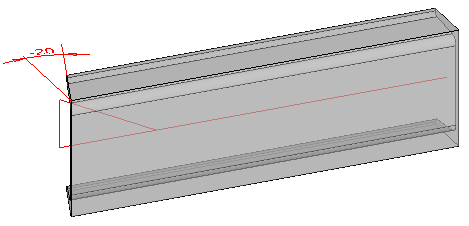
Angle start 2: -20°